NSFW Daily · 06
AI Video Camera Prompts & Multi-Shot Character Consistency Guide
Creators searching for AI short drama tools or AI video camera prompts rarely fail on single-frame texture — they fail when the face drifts mid-move or three consecutive shots look like three different actors. Whether you are producing vertical romance or 21+ synthetic adult drama, multi-shot continuity comes down to two rules: give each shot exactly one inspectable camera move, and anchor identity with one clean reference image plus identical wardrobe and lighting clauses across every shot.
Why compound camera moves break character identity
A common mistake in AI short-drama production is cramming “drone establish, fast zoom in, 360 orbit, cut to extreme close-up” into a single 8-second prompt. To satisfy multiple conflicting camera instructions, the video model silently morphs the face and redraws the room mid-clip.
Across our verified runs on Consistent Character Video and AI Storyboard Generator, one 8-second generation reliably holds one single camera trajectory. Let the camera push in slowly, orbit smoothly, or track backward — and leave cuts to Storyboard mode or your timeline editor.
- One camera move per clip: never combine push-in, orbit, and cuts inside one 8-second prompt
- Name focal length and framing: write “35mm medium to close-up push” instead of “cinematic camera”
- Let Storyboard handle cuts: generate three separate shots and join them cleanly
Four high-stability AI video camera prompt templates
We distill daily short-drama and 21+ synthetic two-hander blocking into four dependable camera moves. Drop any of these clauses directly into the fourth slot (Camera) of the five-field prompt structure:
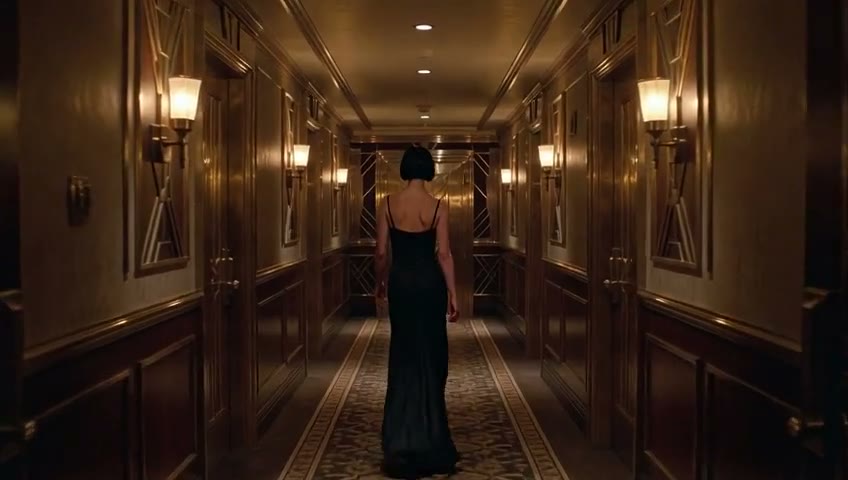
First is the Locked-Axis Slow Push-In (35mm) for rising tension and whispered dialogue; second is the 180° Smooth Parallax Orbit (50mm) for two-character standoffs; third is Stabilized Backward Tracking for corridor entrances; fourth is Low Crane Up & Hold for opening or closing beats.
- Slow Push-In: Locked axis, 35mm lens pushing in very slowly from medium to close-up, 8s continuous shot
- 180° Orbit: 50mm lens executing a smooth 180-degree orbit around the subjects with soft background bokeh
- Backward Track: Stabilized handheld medium tracking shot moving backward in sync with the subject's pace
- Low Crane & Hold: Subtle crane rise from eye level to a slight high angle before holding a locked frame
Causes face drift & random cuts
Masterpiece cinematic camera work, wide drone shot zooming fast into an extreme close-up of her eyes, then spinning 360 degrees and cutting to the man's POV.
Locks identity & trajectory
Using the same 21+ synthetic adult woman from the reference image, short black hair, black velvet dress. She pauses at the corridor door and looks into the lens. Locked axis 35mm slow push from medium to close-up, 8s, breath only.
Using the exact same clearly 21+ synthetic adult woman from the reference image, keeping short black hair, fitted black velvet dress, and cool-toned skin unchanged. Late-night hotel corridor lit by warm wall sconces casting a soft rim light. She walks slowly toward the suite door, stops, and raises her eyes directly into the lens with visible breathing. Locked axis 35mm lens pushing in very slowly from medium to close-up, 8 seconds, one continuous shot. Soft footsteps on carpet and breath only — no score, no captions, no cuts.
Multi-shot character consistency: keeping one face across three cuts
In short-drama workflows, a reference image alone is not enough if your text prompt changes the lighting or wardrobe description between shots. To keep the exact same character across three consecutive clips, repeat the identical identity prefix word-for-word at the start of every shot.
Building on Daily 02: One Reference, lock four elements in sentence one of every shot: age declaration (`clearly 21+ synthetic adult`), hair length and color, wardrobe cut and fabric, and key-light color temperature. Change only the action verb and the single camera move from Shot 1 to Shot 3.
- Clean reference image: single subject, within 30° of front-facing, even key light, no heavy occlusion
- Verbatim identity prefix: copy-paste the exact hair, dress, and lighting clause across all shots
- Consistent lighting ratio: do not jump from warm tungsten sconces in Shot 1 to harsh daylight in Shot 2
Three-shot short-drama sequence: corridor entrance to doorway standoff
Open Storyboard mode and stage a 20+ second dramatic sequence using three 6–8 second shots with complementary camera moves:
- Shot 1 (Entrance · Tracking): Same 21+ synthetic lead walking down the warm corridor; stabilized backward medium tracking shot
- Shot 2 (Pause · Slow Push-In): She stops at the suite door and turns to the lens; 35mm locked-axis slow push-in from medium to close-up
- Shot 3 (Standoff · 180° Orbit): Door opens and two 21+ synthetic adults stand face-to-face; 50mm gentle parallax orbit
Post-generation four-point inspection before editing
Before stitching clips, inspect each output against the same checklist used on our verified examples page: camera trajectory purity, first-to-last-frame facial geometry, wardrobe collar/sleeve continuity, and clean production room tone.
If a clip inserts an unrequested cut mid-shot, your action clause had too many beats — trim it down to one turn of the head or one step forward and rerun that shot.
- Camera check: did the lens execute only the single push, orbit, or track you specified
- Identity check: do bone structure, hair, and dress match between second 1 and second 8
- Cut check: did the clip stay one continuous take without unrequested hard cuts
- Audio check: is the audio clean room tone and breath without random background music
The 21+ synthetic boundary and interactive preset builder
Every workflow on Huangguo Design is strictly for clearly 21+ synthetic adult characters. Minor-related descriptions and unauthorized real-person likenesses are rejected server-side. Placing `clearly 21+ synthetic adult` in the first clause of every shot enforces the boundary and stabilizes mature facial proportions.
Use the interactive Quick Prompt & Camera Preset Builder right below to combine a scene archetype with a camera move and launch directly into Studio.
FAQ
FAQ
How do I keep the exact same character face across multiple AI short-drama shots?
Combine two controls: upload one clean, front-lit reference portrait in Consistent Character (r2v) or Storyboard (board) mode, and repeat the exact same identity, hair, wardrobe, and key-light clause in the first sentence of every shot while varying only the action beat and single camera move.
Why does my character's face morph when I ask for dynamic camera movement?
Asking for multiple camera moves (such as zoom + orbit + cut) inside one 8-second generation forces the model to hallucinate transitions. Restrict each clip to one single camera trajectory — such as a 35mm slow push-in or stabilized backward track.
How do I prevent intimate or dramatic two-person prompts from folding into generic mood shots?
Replace abstract adjectives like “passionate” or “cinematic” with one concrete physical verb naming body part and direction (for example, tucking hair behind her ear until foreheads touch), paired with a locked-axis slow push-in.
Can I build and test camera prompts before entering an invite code?
Yes. The zero-login Quick Prompt & Camera Preset Builder on this page lets you combine scene archetypes and camera moves, copy the five-field prompt, or click Open in Studio with parameters pre-filled.
ZERO-LOGIN · QUICK PROMPT & CAMERA PRESET BUILDER
Pick a scene archetype and camera move, then open directly in Studio
Skip the blank prompt box. Combine a 21+ synthetic scene archetype with one inspectable camera move, tweak the five-field prompt, and launch straight into the matching Studio mode.
1. Scene Archetype (auto-selects Studio mode)
2. Camera Move Preset (one single move per shot)
21+ synthetic adult characters only. Clicking Open in Studio pre-fills both the mode and prompt.
Tonight
Pick your camera preset and open this shot in Studio
Use the zero-login Quick Prompt & Camera Preset Builder below, or paste the five-field prompt directly into Consistent Character (r2v) or Storyboard (board) mode.