NSFW Daily · 07
AI Short Drama Character Consistency & Multi-Episode Workflow (2026)
Generating a single 8-second clip is easy, but producing a 10-episode vertical AI short drama — whether werewolf contract romance, palace rain standoffs, or cyberpunk thrillers — breaks down when Episode 3 looks like a recast actor or a collar morphs mid-scene. Here is the exact 2026 multi-episode character consistency workflow proven across Huangguo Design, huangguodrama.ai, and reelshorts.app.
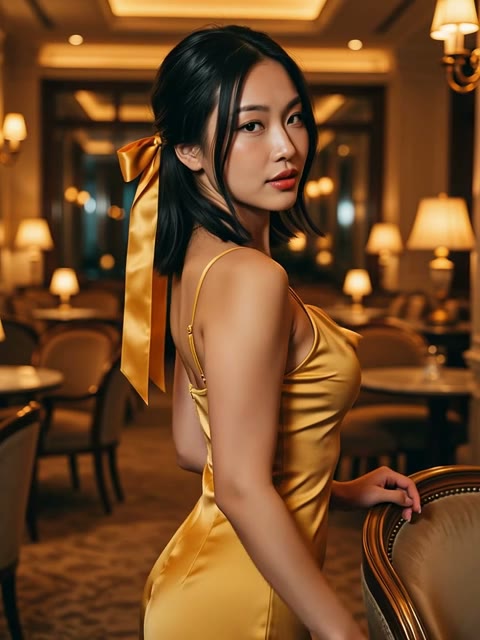
Why single shots hold up but multi-episode series drift
Teams often upload a clean reference portrait for Episode 1 Shot 1, then in Episode 2 switch locations and shorten the prompt to “the same heroine argues on a balcony.” Because every video generation call is stateless, dropping the explicit hair, fabric, or key-light color temperature causes the model to blend the character toward generic scene priors.
Across our benchmarks on Consistent Character Video, multi-episode continuity relies on one non-negotiable rule: always feed the original clean Master Reference portrait, and copy-paste the exact same four-part identity prefix word-for-word at the start of every single shot.
- Never daisy-chain video screenshots: feeding blurry frame grabs from Episode 1 into Episode 2 compounds generation artifacts like a photocopy of a photocopy
- Never abbreviate wardrobe clauses: even in a tight close-up, keep the full hair length, dress fabric, and neckline description
- Match key-light color temperature across cuts within the same scene so skin tones stay anchored
Step 1: Lock a verbatim four-part Character Bible prefix
Before rolling Episode 1, write a 35-word identity prefix for each lead at the top of your production script. Whenever you dispatch a job in Consistent Character (`r2v`) or Storyboard (`board`), paste this sentence without changing a single word:
The four mandatory anchors are: 21+ synthetic age declaration (`clearly 21+ synthetic adult`) + facial structure & skin tone + exact hair length/parting/color + signature wardrobe cut, fabric & accessory.
- Anchor 1 · Age boundary: always start with “clearly 21+ synthetic adult woman/man”
- Anchor 2 · Hair & bone structure: specify shoulder-length black hair or silver wolf-cut hair, never vague words like “stylish”
- Anchor 3 · Fabric & neckline: name “fitted dark-gold velvet gown” instead of generic “evening dress”
- Anchor 4 · Signature accessory: a persistent detail like pearl drop earrings or holographic visors gives the viewer's eye an instant continuity lock
Drifts by Episode 2
The same female lead is now in a castle corridor, looking back angrily at the camera with dramatic short-drama tension, fast zoom in and cut to close-up.
Holds identity across 10+ episodes
Using the exact same clearly 21+ synthetic adult female lead from the reference sheet, cool-toned skin, shoulder-length black hair, fitted dark-gold velvet gown, and pearl drop earrings unchanged. She stops before the bronze castle door and turns to the lens. Locked axis 35mm slow push from medium to close-up, 8s.
Using the exact same clearly 21+ synthetic adult female lead from the reference sheet, keeping cool-toned skin, shoulder-length black hair, fitted dark-gold velvet gown, and pearl drop earrings unchanged across episodes. Late-night castle corridor lit by warm left-side wall sconces casting a soft rim light. She stops before the carved bronze door, rests her left hand on the ring knocker, and slowly turns her head to look straight into the lens on a cliffhanger beat. Locked axis 35mm lens pushing in very slowly from medium to close-up, 8 seconds, one continuous shot. Breath and silk rustle only — no score, no captions, no cuts.
Step 2: Combining r2v, i2v, and Storyboard across a 60-second episode
A 60-second vertical short-drama episode typically combines 7 to 8 clips. Instead of forcing every shot through text-to-video, hand off shots between Consistent Character (r2v), Image to Video (i2v), and Storyboard (board) based on blocking complexity:
- Single-lead cliffhanger hooks → r2v: pair the Master Reference portrait with a 35mm slow push-in for the crucial first 3 seconds
- Two-lead environmental standoffs → i2v: lock a composed two-person first frame (such as an umbrella in palace rain), then animate one deliberate gesture
- Three-beat action or dialogue sequences → board: stage entrance, pause, and brush-past in Storyboard mode to preserve lighting continuity
Step 3: Three high-converting short-drama presets in the builder
Informed by top-performing vertical series on huangguodrama.ai and reelshorts.app, we added three production-ready short-drama presets directly into the zero-login builder on this page:
Choose Wolf King Cliffhanger Hook (r2v) for candlelit werewolf contract romance, Palace Rain Confrontation (i2v) for period-drama umbrella tension in a downpour, or Cyberpunk Chase Multi-Shot (board) for three-shot neon pursuit continuity.
- Wolf King Cliffhanger Hook (r2v): silver-haired werewolf heir + crimson velvet heroine, built for intense eye-lock hooks
- Palace Rain Confrontation (i2v): pale silk robes + dark oiled-paper umbrella in heavy rain, built for fluid and micro-expression stability
- Cyberpunk Chase Multi-Shot (board): three consecutive shots locking matte leather coats and holographic visors across action beats
Step 4: Four-point continuity inspection before timeline assembly
Before dropping clips into your NLE timeline, run the same four-point inspection documented on our verified examples page. If a single 8-second clip drifts or inserts an unrequested cut, simplify the action verb and regenerate only that slot.
- Frame 1 vs. Frame 192 check: verify jawline, bridge of nose, and hairline remain stable
- Collar & accessory check: confirm velvet neckline, earrings, or visors do not vanish mid-turn
- Single-trajectory camera check: verify the lens executed only the single push, orbit, or track requested
- Clean room-tone check: ensure only breath, rain, or footsteps are present so dialogue dubbing sits cleanly
Step 5: The 21+ synthetic boundary & live short-drama showcase
All workflows on Huangguo Design strictly require clearly 21+ synthetic adult characters; minor-related imagery and unauthorized real-person likenesses are blocked. Keeping `clearly 21+ synthetic adult` in sentence one of your Character Bible prefix satisfies policy and stabilizes mature facial proportions.
Want to watch live AI short dramas produced with these workflows before rolling your own? Use the showcase bar in the builder below to visit huangguodrama.ai and reelshorts.app, or click Open in Studio to start shooting.
FAQ
FAQ
Should I use a screenshot from Episode 1's video as the reference image for Episode 2?
No. Video frames contain motion blur and compression artifacts that compound across episodes. Always feed the original high-resolution, evenly lit Master Reference still portrait into every episode's r2v and board jobs.
How do I keep two leads consistent when cutting between solo close-ups and two-shots?
Use Consistent Character (r2v) with each actor's Master Reference for solo close-ups, and use Image to Video (i2v) or Storyboard (board) anchored by a clean two-person keyframe and both actors' verbatim wardrobe clauses for two-shots.
Where can I watch complete AI short dramas made with this workflow?
You can inspect raw SHA-256 verified clips on our /examples page, or click the showcase links inside the Quick Studio Builder to stream full vertical AI short dramas on huangguodrama.ai and reelshorts.app.
Can I customize the Wolf King, Palace Rain, and Cyberpunk Chase presets before opening Studio?
Yes. Clicking any preset loads its five-field prompt and selects the matching Studio mode (r2v, i2v, or board). Edit any wardrobe or camera detail in the text box and click Open in Studio.
ZERO-LOGIN · QUICK PROMPT & CAMERA PRESET BUILDER
Pick a scene archetype and camera move, then open directly in Studio
Skip the blank prompt box. Combine a 21+ synthetic scene archetype with one inspectable camera move, tweak the five-field prompt, and launch straight into the matching Studio mode.
1. Scene Archetype (auto-selects Studio mode)
2. Camera Move Preset (one single move per shot)
🎬 Watch Live AI Short Dramas on huangguodrama.ai & reelshorts.app (观看用此工作流生成的短剧成片)
21+ synthetic adult characters only. Clicking Open in Studio pre-fills both the mode and prompt.
Tonight
Test the new short-drama presets or watch live episodes
Pick Wolf King Cliffhanger Hook, Palace Rain Confrontation, or Cyberpunk Chase Multi-Shot in the builder above to launch Studio or watch finished series on huangguodrama.ai and reelshorts.app.