Shot Daily · 02
Same face: lock one clean reference still before adding a co-star
Lesson 01 narrowed the brief to one inspectable scene; Lesson 02 fixes why your lead's face drifts mid-move. A classic mistake is uploading seven mixed stills at once — different outfits, side profiles, harsh neon, daylight selfies — leaving the model unsure which face is canonical. Start with one clean, unobstructed character sheet still and validate a 4-second clip.
Where this lesson fits
Shot Daily 01 covered what makes a shot inspectable. Lesson 02 focuses on minimizing facial drift. All three language editions teach the same studio discipline.
Our Consistent Character manual documents API limits (up to 7 reference images, optional voice, 720p cap). Here we focus purely on the practical shooting order.
Core rule: the still locks identity, not pose
A reference portrait constrains bone structure, hair silhouette, skin tone, and build. It is not a contract for blocking, camera angle, or room layout — and wardrobe holds much better when restated in text. Treating a portrait as a full scene layout causes stiff posture and portrait backdrops to bleed into dramatic shots.
Separate who from what: the image defines identity; your text prompt defines room, lighting, gesture, and lens. Crop out watermarks, text overlays, or background clutter before uploading.
- Lock: facial geometry, hair length/parting, wardrobe fabric, headcount
- Write separately: blocking, room, key light, single gesture, camera move
- Strip out: watermarks, captions, sunglasses, and cluttered backgrounds
Start with one master still, not seven
While the endpoint accepts up to seven images, first-pass testing works best with one canonical portrait. Mixing seven lighting setups and outfits averages features into a stranger. Validate 4 seconds from a clean, front-or-three-quarter still in matching wardrobe before adding secondary angles.
Voice references never replace visual references — audio without a portrait still generates an unanchored face.
- Unobstructed face within 30° of front-facing, even lighting
- Hair and outfit match tonight's scene
- Original fictional character sheet or explicitly licensed talent still
- Name <IMAGE_0> in text and repeat hair, dress, and solo headcount
Why 4 seconds beats 15 seconds for identity checks
Identity drift compounds with heavy motion, occlusion, and long duration. Four seconds is plenty to verify one slow turn, one blink, and one hand resting on a chair. Fifteen-second requests are far more likely to invent cuts or extra characters.
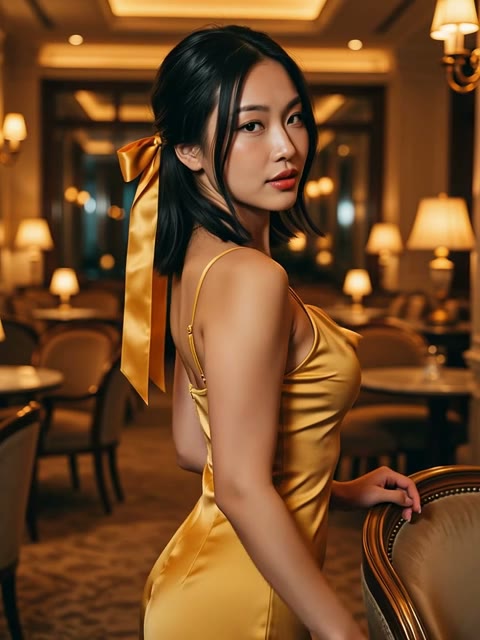
Our public benchmark uses 1 still, 4 seconds, 3:4, 480p — holding the gold-dress identity while documenting slight pose and facial drift on the verified examples page.
Drifts fast
Use these seven different outfit photos to shoot a 15-second dramatic trailer with multiple angles and fast cuts.
Inspectable
One clean master portrait, one character, warm lounge, slow turn and hand on chair, 4 seconds. Scrub frame 1 to frame 97.
Use <IMAGE_0> as the sole character identity reference. Keep the exact same fictional female lead: chin-length dark hair, champagne-gold velvet dress, and consistent build. The portrait locks facial structure, hair, and wardrobe — not pose, room, or camera. She stands in a warm lounge, turns slowly toward the lens, blinks once, and rests one hand on a chair back. Locked camera, 4 seconds, breath and fabric rustle only, no captions, no second person.
Post-generation checklist
Scrub the downloaded MP4 from start to finish. When drift appears, subtract variables — swap in a cleaner portrait or reduce motion beats rather than writing longer paragraphs.
- Compare frame 1 and final frame jawline, eyes, and nose bridge
- Check hair silhouette and dress neckline through the turn
- Ensure no unrequested second person or text overlay appeared
- Confirm the gesture stayed strictly turn, blink, and hand on chair
- If features soften, match prompt key-light color temperature closer to the still
Clean character assets first
Consistent Character workflows are designed for original fictional character sheets and authorized talent assets. Minor-related imagery and unauthorized real-person likenesses are prohibited.
Building a clean, reusable fictional Master Reference portrait gives multi-episode short dramas a reliable foundation.
Next lesson
Once solo identity holds, you are ready for two-handers. Shot Daily 03 covers anchoring two distinct leads, preventing unrequested third characters, and keeping hands/limbs clean across overlaps.
Lock this solo 4-second test first.
FAQ
FAQ
Why shouldn't I fill all 7 reference slots right away?
Conflicting lighting, hairstyles, and angles across multiple stills average out facial landmarks. One clean, matching Master Reference makes debugging effortless.
Does a reference still guarantee 100% identical geometry on every frame?
No. Reference images act as strong conditioning, not rigid 3D mesh locks. Steep profile turns and long durations can still introduce slight drift.
Can voice reference alone lock a character?
No. Audio conditions voice timbre only; visual continuity requires a clean portrait still plus consistent wardrobe text.
Why test with 4 seconds instead of 15?
Four continuous seconds isolate identity stability during a single gesture without inviting mid-clip scene cuts.
ZERO-LOGIN · QUICK PROMPT & CAMERA PRESET BUILDER
Pick a drama scene archetype and camera move, then open directly in Studio
Skip the blank prompt box. Combine a short-drama scene archetype with one inspectable camera move, tweak the five-field prompt, and launch straight into the matching Studio mode.
1. Scene Archetype (auto-selects Studio mode)
2. Camera Move Preset (one single move per shot)
Watch Live AI Short Dramas on huangguodrama.ai & reelshorts.app
Clicking Open in Studio pre-fills both the generation mode and prompt.
Tonight
Lock this character tonight
Open Consistent Character (r2v), upload one clean fictional portrait, paste the prompt below, and inspect a 4-second run.